CustomConnectButton
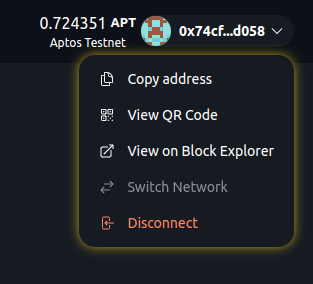
Scaffold Move includes a custom Wallet Connect button with the following features:
- Balance Display: Shows native token balance of connected address.
- Chain Name: Displays connected blockchain name.
- Custom Modal: Offers address copying, QR code view, block explorer link, network switching, a faucet option, and disconnect option.
The wallet dropdown shows a "Faucet" option for networks with a faucet_api in Chains (such as Movement testnet and the local network): it sends 1 token to the connected account. For networks that only have a faucet_url (such as Aptos testnet), "Faucet" links to the faucet page instead. "Switch Network" appears when targetNetworks has more than one network. It is disabled for Petra, which rejects network changes from the app; switch networks in Petra and the app follows.
The connect dialog lists the detected wallets, and wallets that are not detected, with install links, under "More Wallets". See supported wallets.
Screenshot
Usage
import { CustomConnectButton } from "~~/components/scaffold-move";
<CustomConnectButton />